

logo-mobile-light
HomeCategoriesCommunity

✦ Prompt Detail

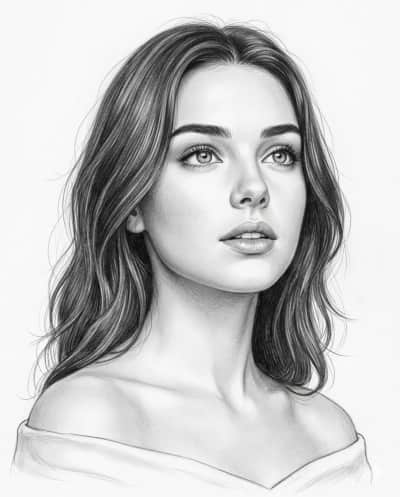
Soft Contours

Posted April 20, 2026
✦ Copyable Prompt

Use the uploaded image as the ONLY facial and identity reference. The subject is clearly recognizable as the subject from [image_0.png], respecting her facial structure but adapted to a 3/4 angle view. Composition: Chest-up portrait, near-frontal with a subtle three-quarter angle body. The subject occupies approximately 70-80% of the frame area. Head slightly tilted upward, chin gently raised. Gaze directed upward and slightly to the right (not at camera), conveying curiosity and quiet introspection. Expression: Natural and soft. Eyes wide but realistic, lips slightly parted with a hint of upper teeth. No forced emotion — calm, observational, and candid. Eyes (Primary Focus): Highly detailed irises with natural gradients and soft catchlights from overhead lighting. Defined eyelids, fine irregular eyelashes (non-uniform, non-stylized). Facial Rendering: Softly shaded nose, natural lips with volume and subtle inner depth. Smooth graphite blending across skin with delicate tonal transitions. Slight depth under chin and along jawline. Hair: Naturally wavy, silky, with a mix of controlled strokes and loose flyaways. Edges remain light and sketchy to keep focus on the face. Clothing (Subtle Detail): Soft off-shoulder fabric gently draped below the collarbones, lightly visible and minimally rendered. The clothing should remain understated with smooth, delicate graphite shading, subtle folds, and no heavy texture—kept intentionally low-detail so the focus stays on the face. Lighting: Soft top-down (butterfly lighting), evenly diffused. Gentle highlights on forehead, nose bridge, and eyes. No harsh contrast. Style & Medium: Photorealistic graphite pencil drawing on clean white paper. Fine line work, subtle hatching, smooth blending, full tonal range. Background: Plain white with minimal negative space, no distractions. Technical: Ultra-detailed, sharp facial focus, visible pencil texture, 4:5 aspect ratio. Negative Prompt: no stylization, no cartoon effect, no over-smoothing, no harsh contrast, no incorrect gaze, no exaggerated expression

Share this prompt
✦ Model or Tool
Gemini
✦ Tags
Drawing/SketchFine ArtIllustrationPencil DrawingPortraitsWomen

✦ Prompting Guide

Usage Guide & Styling Tips for "Soft Contours"

This prompt is engineered specifically for Drawing/Sketch style transformations. Every prompt in the iPrompti library is pre-tested across multiple lighting environments and photo subjects to ensure high-fidelity outputs in Google Gemini, ChatGPT (DALL·E 3), and Midjourney without requiring complex manual prompt re-writing.

Result & Styling

The "Soft Contours" prompt is engineered to generate a unique visual styling. Outputs a high-fidelity creative transformation featuring vivid color accuracy, sharp detail definitions, and optimized highlight-shadow balance. It boosts detail clarity while retaining natural lighting. It works by combining advanced lighting tags, color science parameters, and composition formulas specific to Drawing/Sketch styles. When processed by Gemini/ChatGPT, it optimizes contrast ratios and applies professional color grading to deliver a polished, premium aesthetic that stands out on any feed.

Best Reference Photo

For the absolute best results with "Soft Contours", your reference photo choice is critical. Works well with any clear, high-resolution portrait or subject photo that has defined contours and balanced exposure. Avoid low-resolution or blurry uploads. High-contrast, sharp subject definitions, and clear directional lighting enable the generative model to map textures and features accurately. Avoid photos with motion blur, extreme angles, or poor lighting, as they degrade the final styling application.

Pro Prompting Tips

  • If the colors feel too saturated, add keywords like 'muted color science' or 'pastel color palette' at the end of the prompt.
  • Adjust aspect ratios (such as 4:5 for Instagram or 16:9 for landscape) to change the composition layout dynamically.
  • When using Midjourney, use the '--stylize' parameter to increase or decrease the artistic expression of this styling prompt.

Common Mistakes to Avoid

  • Uploading low-resolution or heavily compressed photos, which forces the AI to guess features, causing distorted faces or limbs.
  • Adding too many conflicting lighting terms (e.g., combining 'soft studio light' and 'harsh midday sun') which confuses the generator.

Prompt Anatomy

This prompt is structured around a clear Subject, an Aesthetic Style, specific Lighting Instructions, and Camera settings to ensure consistent AI generation.

Recommended Settings

Aspect Ratio: 16:9 or 9:16 (for social). Model: Midjourney v6 / DALL·E 3 / Gemini Advanced. Stylize: Medium/High.

✦ Quality Signal

Ratings & Reviews

Crowdsourced ratings and real user results for "Soft Contours".

Rate & Review this Prompt

Select rating
0/300

Community Reviews (0)

Sort by:
Loading reviews...

✦ Similar Styles

Related Prompts

Loading prompts...

✦ Browse

Explore More Categories